Private beta · Dec 2026 · 50 founding seats at $19/mo for life

Track the wheel the way
you actually trade it.

CSPtoCC tracks the full CSP → roll → assignment → CC lifecycle as one campaign with running cost basis. The Planning Board surfaces earnings clusters across your watchlist before entry. The decay visual grades every open position on capture % and DTE. Portfolio Return benchmarks your trading against buy-and-hold SPY — honestly. Smart Roll computes the next strike when it's time to defend. Built by a wheel trader who got tired of spreadsheets.

Free tier — no card required tastytrade & E*Trade sync Educational tool, not a brokerage
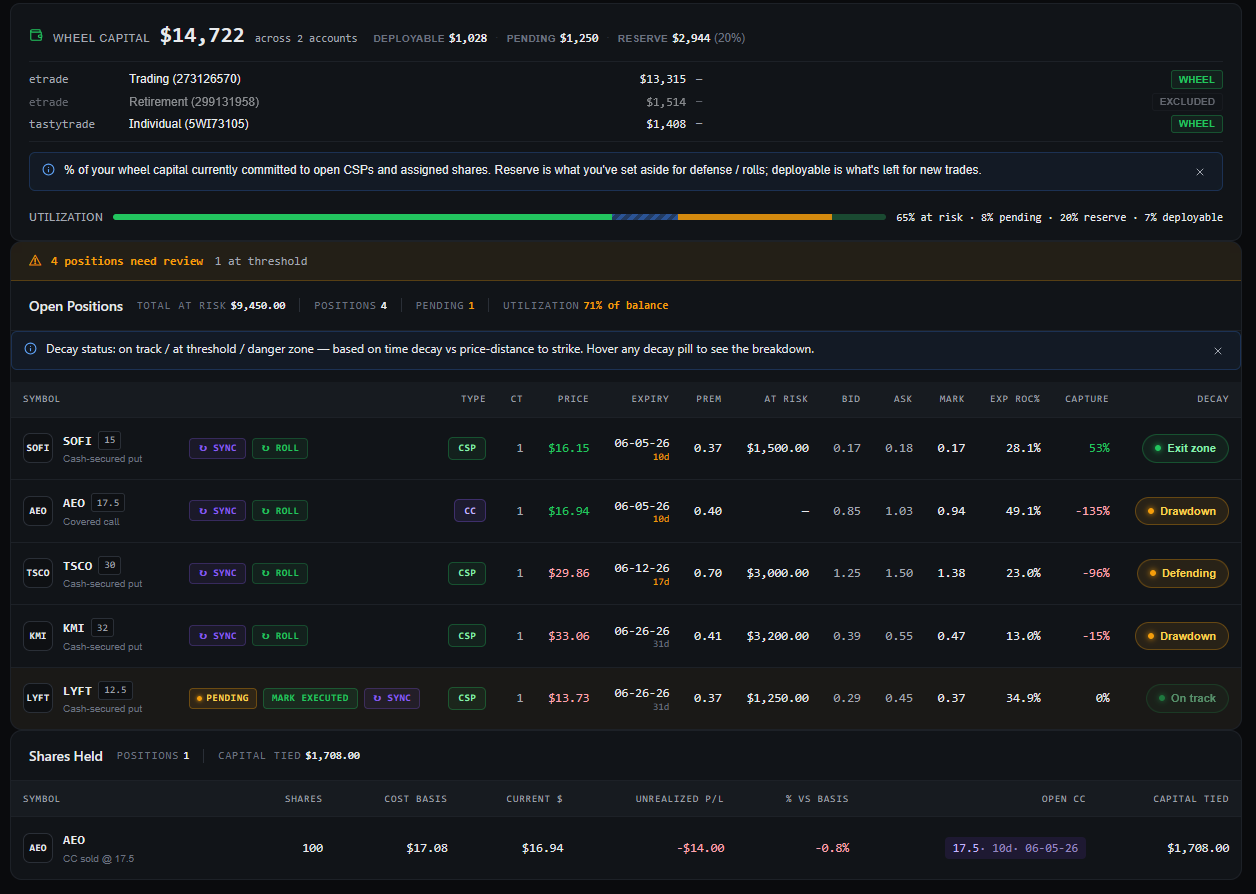
app.csptocc.com / dashboard
CSPtoCC dashboard showing open positions with decay status, Smart Roll buttons, pending-leg workflow, and assigned shares with cost basis.
The spreadsheet tax

Every wheel trader has paid
for these mistakes at least once.

The features in CSPtoCC exist because each one is a scar. Built around the moments a generic trade journal can't see coming.

— $40 IN 24 HOURS

Chasing premium into earnings.

IV 76%, you take the trade, stock moves against you overnight. The premium was the warning sign, not the opportunity.

Pre-trade validator checks IVR, DTE, delta & earnings before you enter.
— THE INVISIBLE CLUSTER

Five positions, three earnings the same week.

You stack CSPs across the month. You don't realize three names report on the same Tuesday until you're already in.

Planning Board surfaces earnings clusters across your watchlist before entry.
— THE COST BASIS MYSTERY

After three rolls, what's the real breakeven?

You roll a put, then roll again, then get assigned. The number in your spreadsheet stopped matching reality two legs ago.

Campaign model recalculates true cost basis after every leg, automatically.
— THE 3 BROWSER TABS

Cross-checking strikes across three expiries.

Week before, target week, week after. Three strikes each. Mental math on annualized ROC. Every. Single. Trade.

Option Chain grid: 3 expiries × delta-filtered strikes, one click to log.
— WHEN TO LEAVE

50% capture at 30 DTE vs 7 DTE — same percent, different decision.

Theta isn't linear. The last week burns faster than the first three. Looking at the percent in isolation is a lie.

Decay visual encodes capture % and DTE into a single recommendation.
— THE ROLL THAT WASN'T

Close Friday, re-enter Tuesday after a red day — new campaign?

Calendar-day rules say yes. Trading-day reality says it's the same wheel cycle. Your records shouldn't disagree.

Roll detection uses trading days, configurable 3–21 days.
What's inside

Nine surfaces that earn
their keep every week.

No bloat. No paper-trading toys. Every screen is something a working wheel trader opens before, during, or after a fill — built and used daily by the person making it.

01 — CAMPAIGN LIFECYCLE

One campaign per wheel cycle. Not one row per leg.

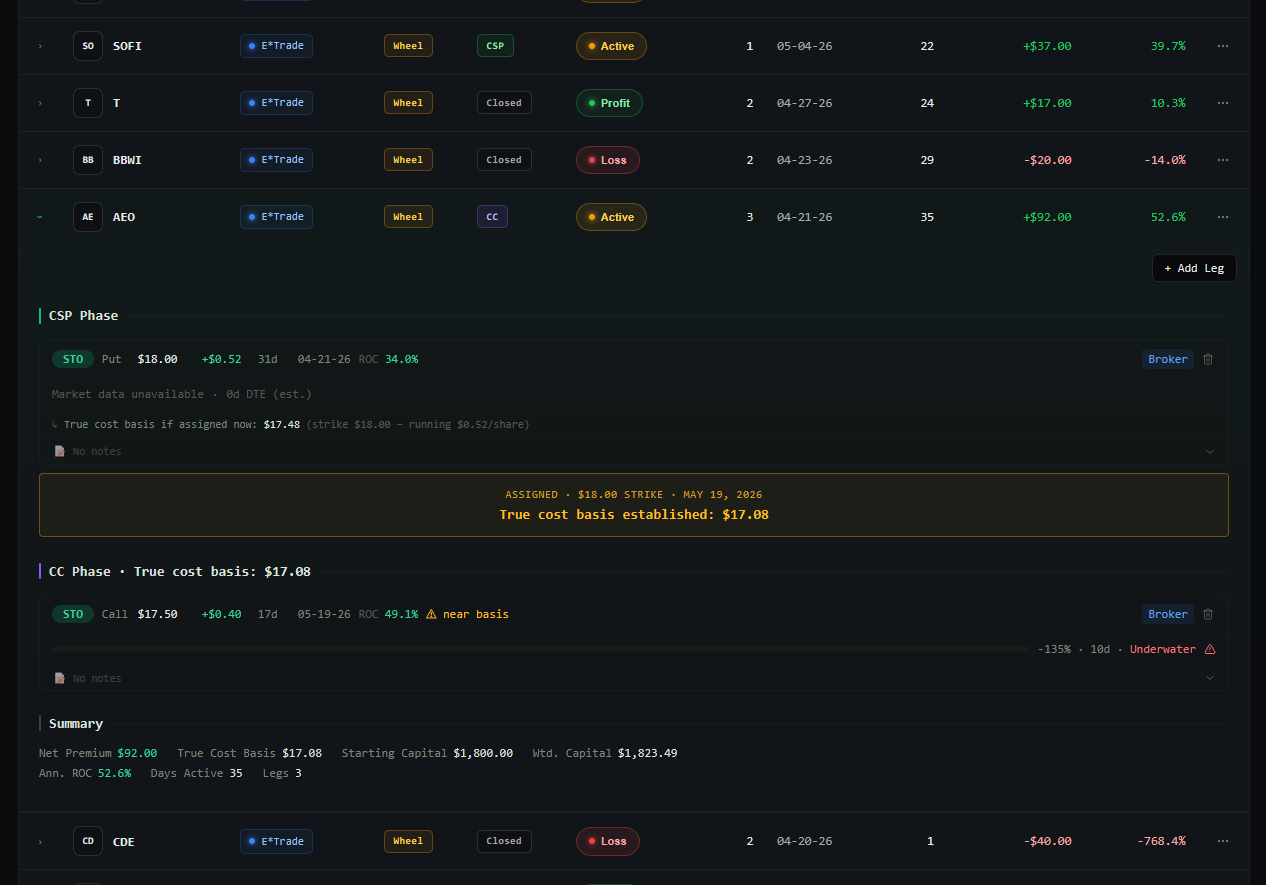
A CSP that rolls, gets assigned, then turns into CCs is one campaign. CSPtoCC threads every leg with running true cost basis, weighted capital, days active, and annualized ROC that reflects the whole cycle — not just the last fill. The assignment moment is a clear visual transition; the CC phase tracks its premium against the new cost basis.

  • Phase-grouped legs (CSP phase ↔ CC phase) with the assignment marker between them
  • True cost basis recalculated after every leg (strike − running premium)
  • Outcome tags: ClosedProfit · ClosedLoss · Assigned · CalledAway
  • One campaign cannot span brokers — accidental misjoins prevented
AEO · CC phase · ActiveTrue cost basis $17.08 · 35d active
AEO campaign expanded showing the CSP phase, the assignment marker establishing $17.08 true cost basis, and the active CC phase below it.
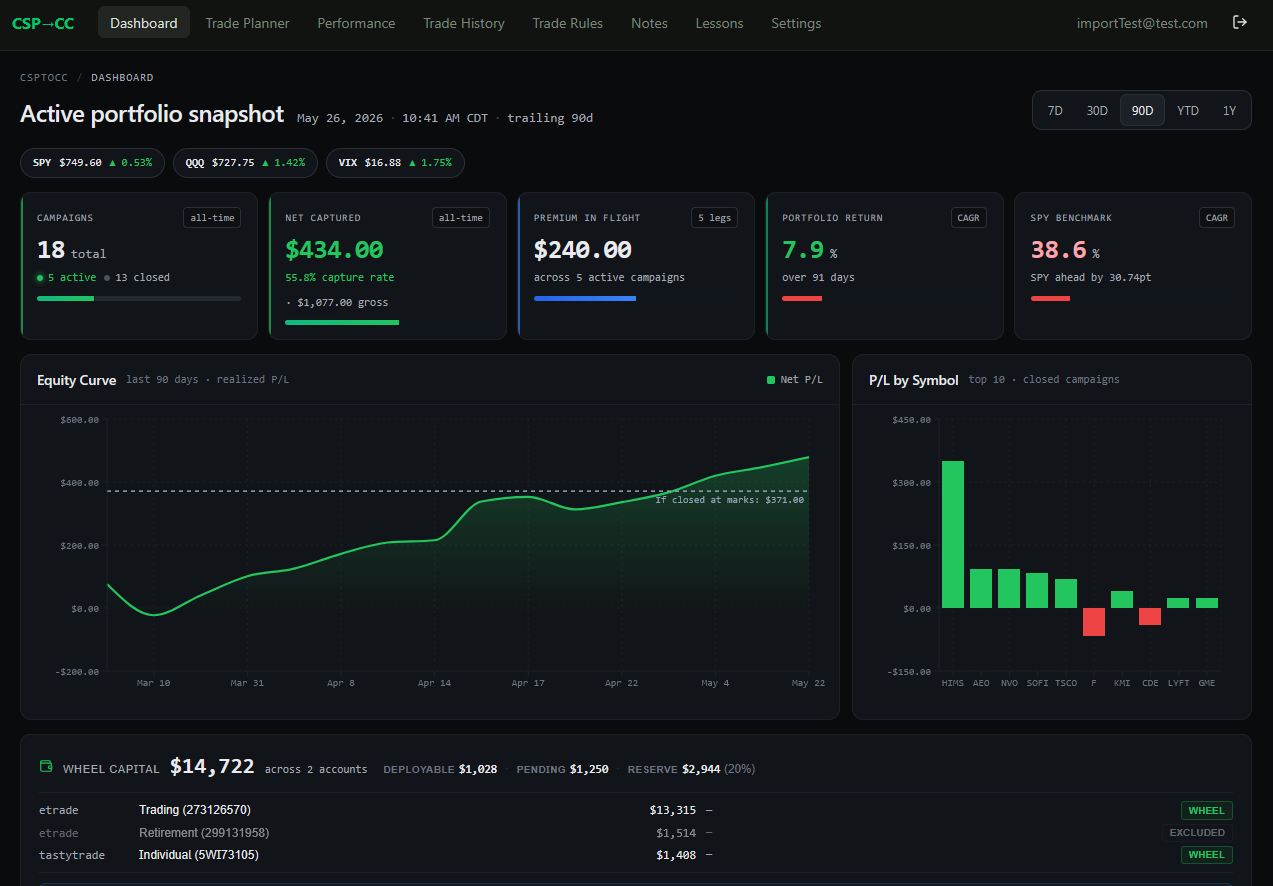
DASHBOARD · Trailing 90dThe brutal honest comparison
Dashboard showing Portfolio Return tile next to SPY Benchmark tile — direct apples-to-apples comparison of wheel performance vs buy-and-hold.
02 — PORTFOLIO RETURN vs SPY

Are you actually beating buy-and-hold?

Every wheel guide tells you what to do. None of them tell you whether your specific account is winning the comparison that actually matters. CSPtoCC computes your portfolio return using the same window, the same start date, the same dollars — and puts SPY's return next to it. Same period, same method, no asterisks.

  • Trailing window matches what you can change — 30D · 90D · YTD · 1Y · All
  • CAGR or simple math, toggle per-tile
  • SPY benchmark via live Polygon data, never your own broker's interpretation
  • Equity curve below the tiles shows realized P/L by close date
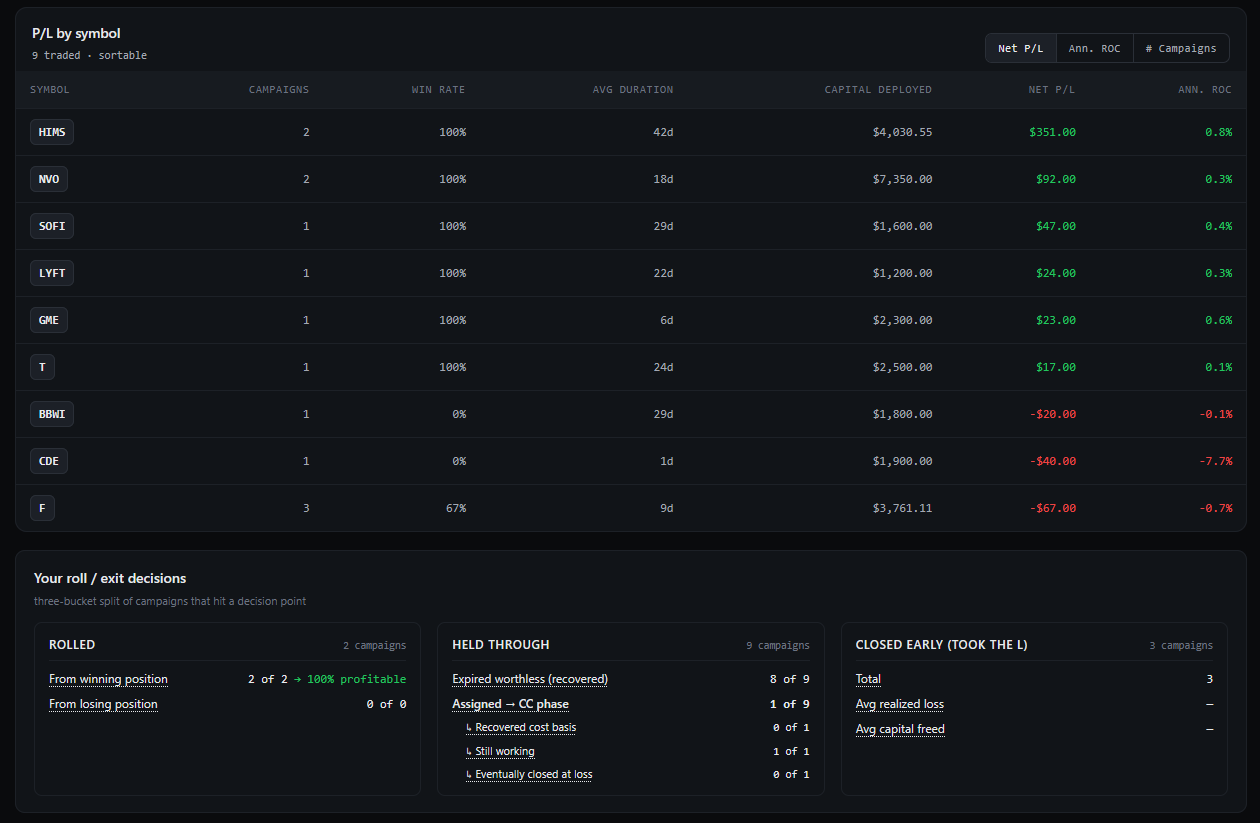
03 — DECISION OUTCOMES

How every campaign actually ended.

Every closed campaign hit a decision point — you rolled it, you held it through, or you closed early and took the loss. Most tools collapse that into "win rate." CSPtoCC splits it into three buckets so you can see which of YOUR decisions paid and which didn't. The held-through bucket sub-splits by expired-worthless vs assigned, and by whether the assignment recovered cost basis. No other wheel tool does this.

  • Rolled · split by winning-position vs losing-position re-open
  • Held Through · sub-split expired worthless / assigned (+ CC recovery state)
  • Closed Early · realized loss + capital freed
  • P/L by symbol above it — sortable by Net P/L, Ann ROC, or # Campaigns
PERFORMANCE · Roll / exit decisions13 closed campaigns · trailing 1Y
Performance page showing P/L by symbol and the three-bucket Decision Outcomes panel (Rolled, Held Through, Closed Early) with sub-breakdowns.
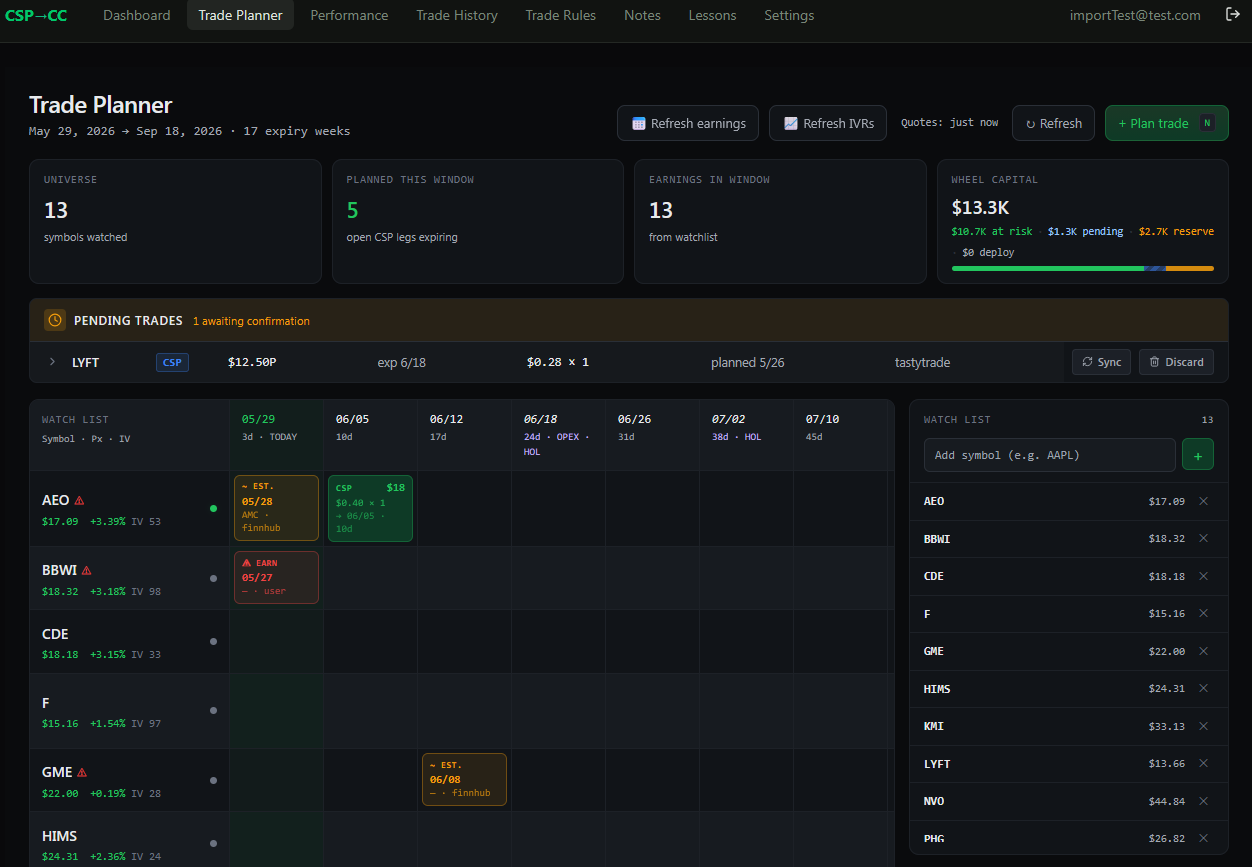
TRADE PLANNER · 17 expiry weeks13 symbols · earnings visible
Trade Planner showing 13 watchlist symbols across 17 expiry weeks with earnings dates and existing CSP campaigns marked per week.
04 — PLANNING BOARD

See the earnings cluster before you enter it.

You opened 5 positions this week. 3 of them have earnings in the same expiry week. You don't know that yet. The Planning Board lays your full watchlist against 17 expiry weeks, marks every earnings date (broker API → 91-day estimate → user confirmation), and shows every open CSP campaign in its expiry column. The pile-up is visible before you click "Plan trade."

  • Free: 15 watchlist symbols · Pro: unlimited
  • Earnings dates from Finnhub + user-confirmed overrides
  • Existing CSP/CC chips by expiry — see your concentrations at a glance
  • Pending trades grid above the board for plans not yet executed
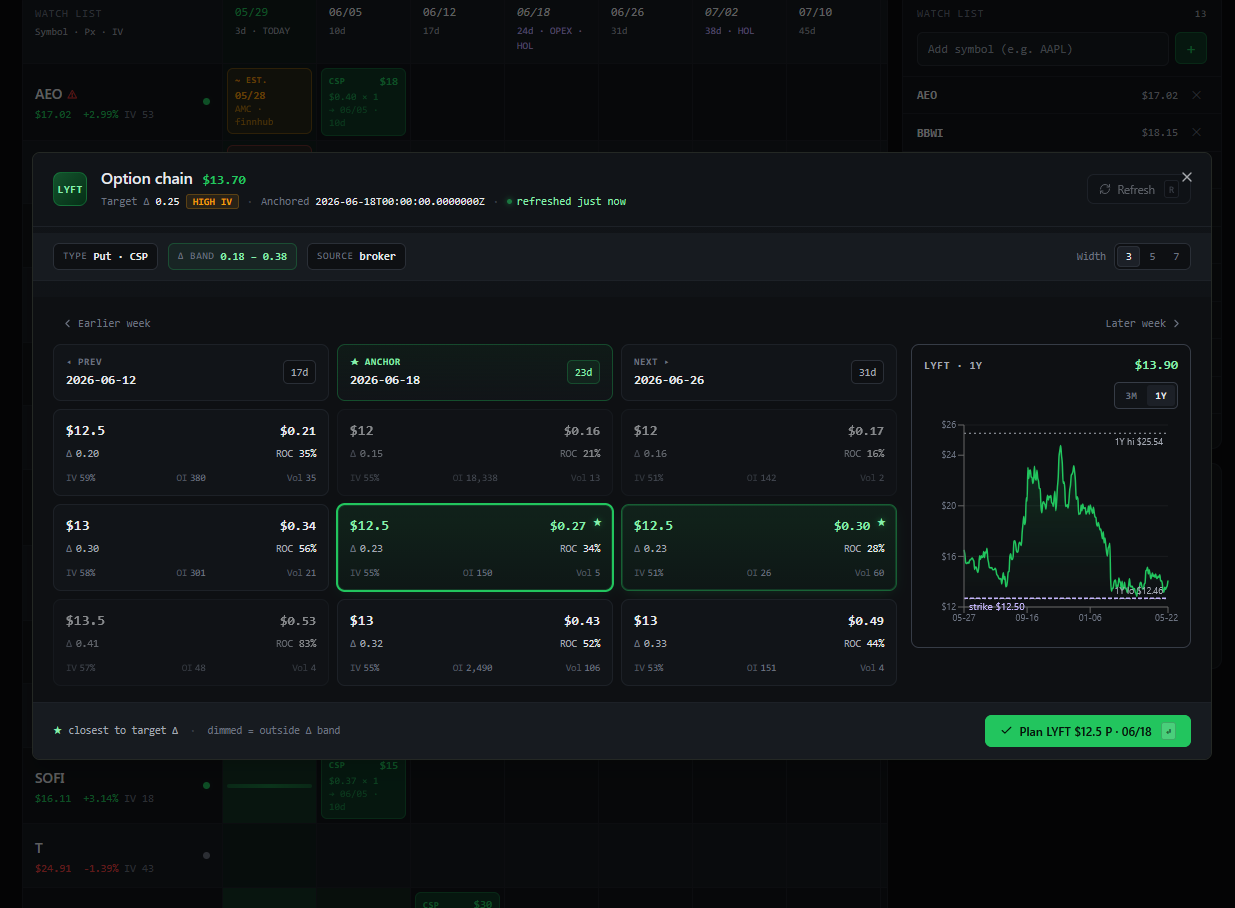
05 — OPTION CHAIN GRID

Three expiries. Your delta band. One click to plan.

Click a symbol on the Planning Board — a chain drawer opens with three consecutive expiries side-by-side, strikes filtered to your delta band, annualized ROC per cell, IV%, OI, Volume. A 1-year price chart on the side shows where the underlying has actually traded. Pick a tile, "Plan trade" pre-fills the entry dialog. Replaces three browser tabs with one read.

  • Anchor week + previous + next — cross-expiry comparison in one view
  • Delta band highlights · width selector 3 / 5 / 7
  • Per-cell metrics: Premium · Δ · ROC% · IV% · OI · Volume
  • Strike-level price chart with current strike line + 1Y range
  • HIGH IV badge ties to the Trade Rules tier system
LYFT · Puts · 0.18–0.38 Δ band$13.70 · HIGH IV
LYFT option chain dialog showing 3 expiries × 3 strikes with delta band highlighting, anchor tile selected, and 1-year price chart on the side.
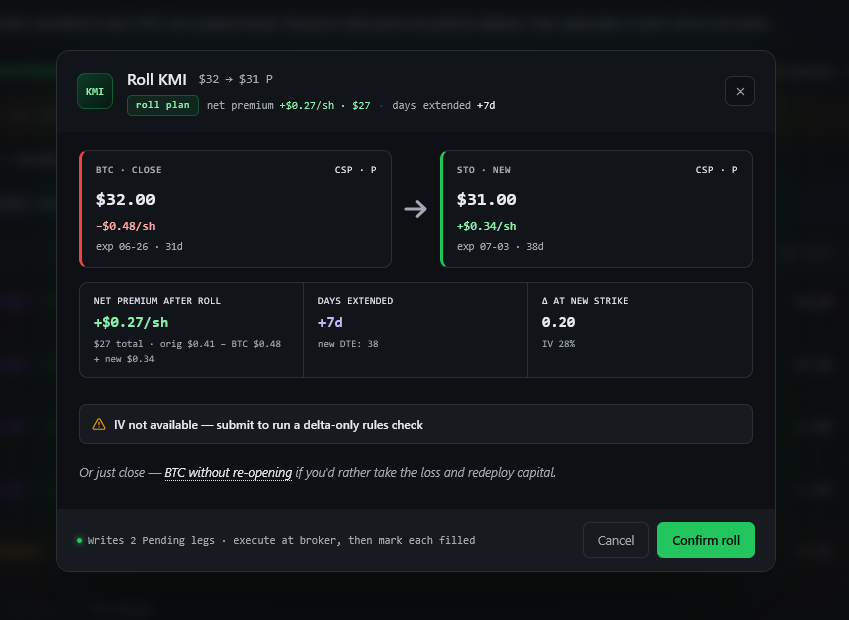
ROLL KMI · $32 → $31 PNet +$0.27/sh · +7d extended
Roll Preview dialog with BTC + new STO pair, net premium math, days extended, delta at new strike, and confirm button.
06 — SMART ROLL

Click Roll. We computed the strike.

When a position needs defense, the math is solvable. Pick a side (roll-down-out / roll-up-out / roll-out), enforce your delta band, require positive net credit, prefer 1σ OTM on ITM rolls. Smart Roll runs that solver against the live chain and surfaces the BTC + new STO pair with the math already done. Confirm writes two Pending legs you mark filled at the broker.

  • Per-row Roll button on every open CSP / CC
  • Net credit, days extended, Δ at new strike — visible before commit
  • Or just close — BTC without re-opening if you'd rather redeploy capital
  • Writes Pending legs · execute at broker · sync marks them filled
07 — TIERED PLAYBOOK

Your rules adapt to volatility.

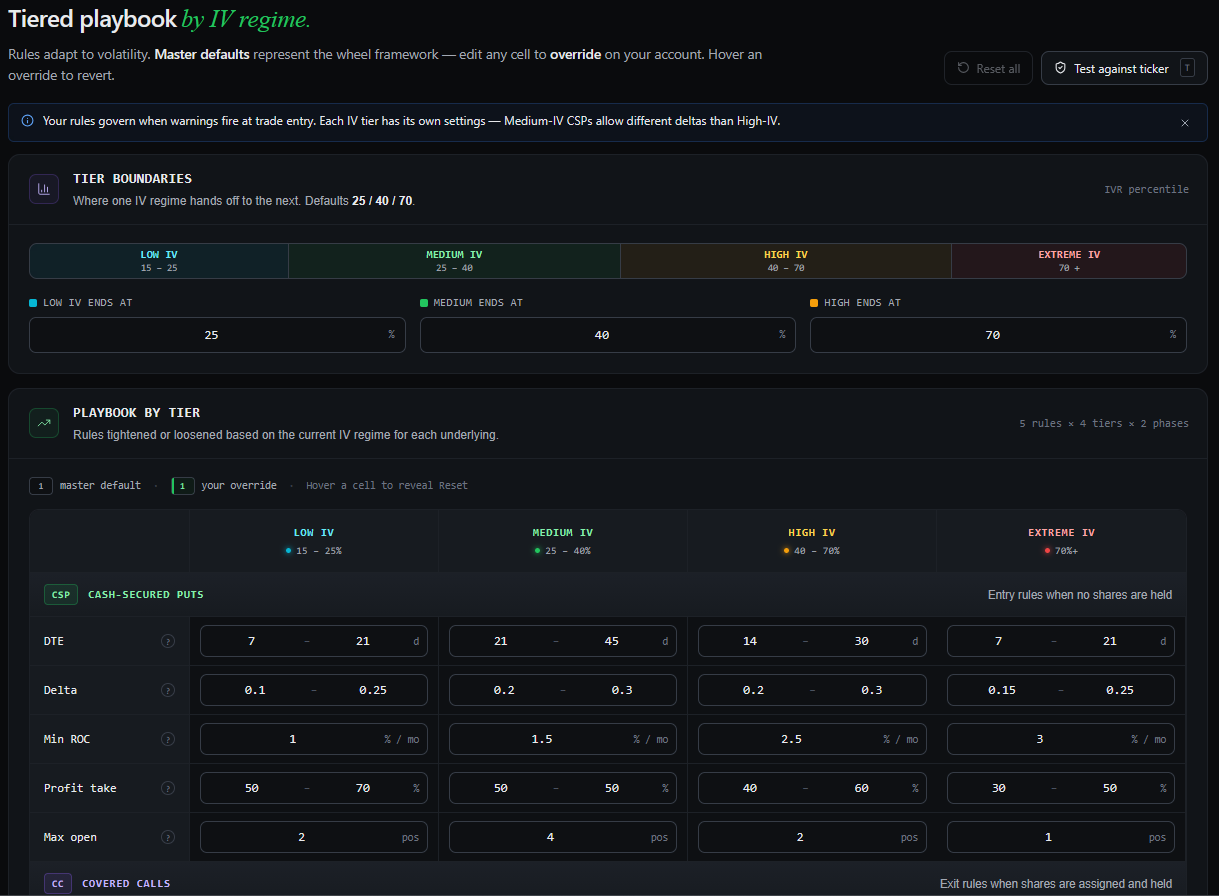
One static rule set across all IV regimes is a lie. Selling 0.30 delta puts in 15% IV is reckless; doing it in 75% IV is responsible. CSPtoCC ships master defaults for four IV tiers (Low / Medium / High / Extreme) across both phases (CSP / CC). Every cell is editable; your overrides save per-account and live alongside the master defaults. The validator picks the right tier automatically based on the symbol's current IV rank.

  • 4 IV tiers × 2 phases × 5 rule types — DTE · Delta · Min ROC · Profit take · Max open
  • Tier boundaries editable (defaults 25 / 40 / 70 IVR percentile)
  • Test against ticker — pick a symbol, see which tier its current IVR fires
  • Master defaults come from the wheel framework; your overrides take precedence
TRADE RULES · Tiered playbook by IV regime5 rules × 4 tiers × 2 phases
Trade Rules page showing the IV-regime tier boundaries and the CSP playbook matrix with DTE, Delta, Min ROC, Profit take, and Max open rules across Low / Medium / High / Extreme IV tiers.
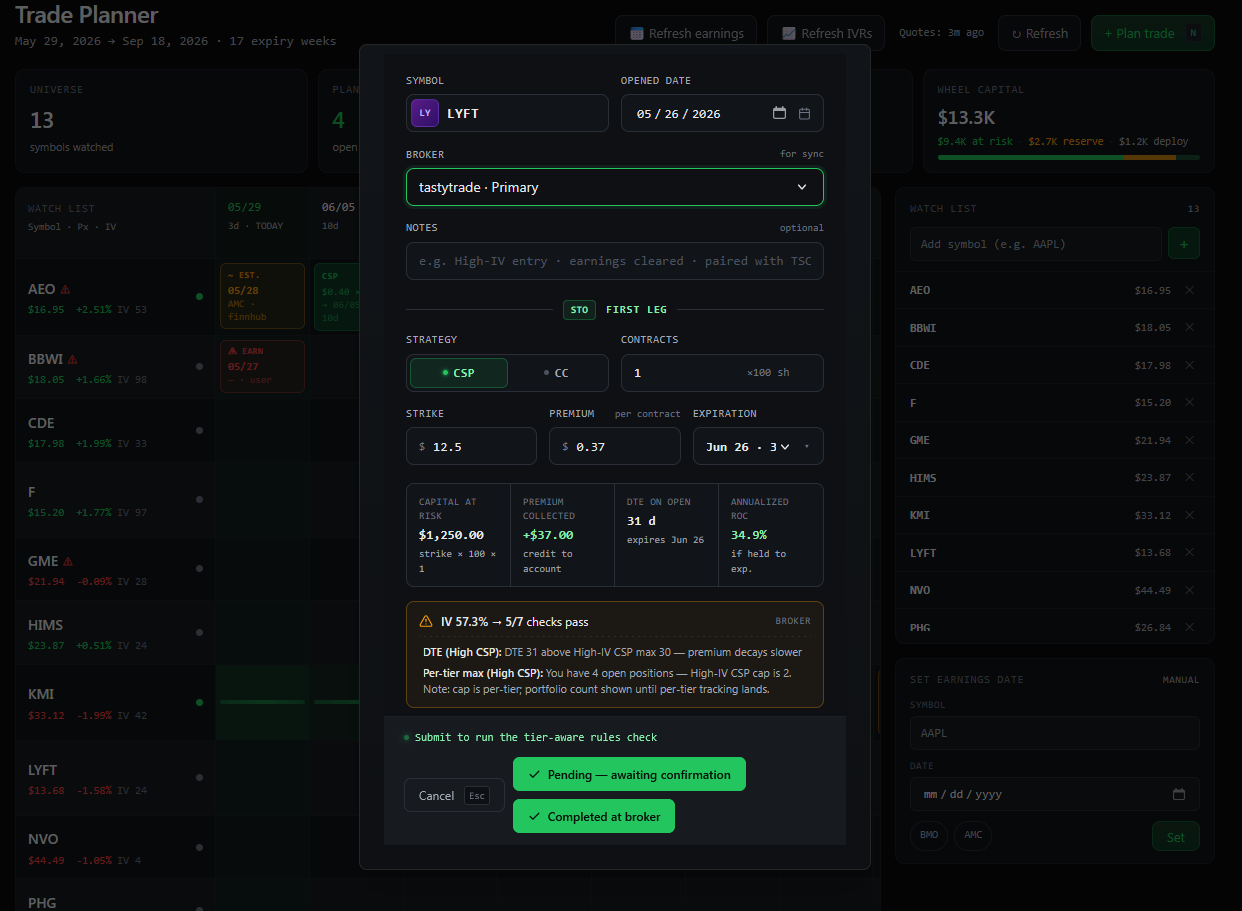
NEW CSP · LYFT $12.5 PIV 57.3% → 5/7 checks pass
Create Campaign dialog open with live validator running — IV 57.3%, 5 of 7 checks passing, tier-aware warnings about DTE above max and per-tier position cap.
08 — PRE-TRADE VALIDATOR

Discipline, enforced before the fill.

You already know your rules. The validator runs them every time you enter a trade so willpower doesn't have to. The dialog shows live as you type — strike, expiry, contracts, IV — and tells you which checks pass and which don't. Tier-aware: a check that passes in High-IV mode fails in Extreme-IV. Warnings are overrideable; the override gets journaled so you can review your patterns later.

  • Capital at Risk, Premium Collected, DTE, Annualized ROC — computed live
  • Tier-aware checks: each warning names the tier whose rule it failed
  • Two-state submit: Pending — awaiting confirmation · Completed at broker
  • Earnings inside expiry → automatic block, override required + journaled
09 — AUTO-JOURNAL

The tool that tells you what you keep doing.

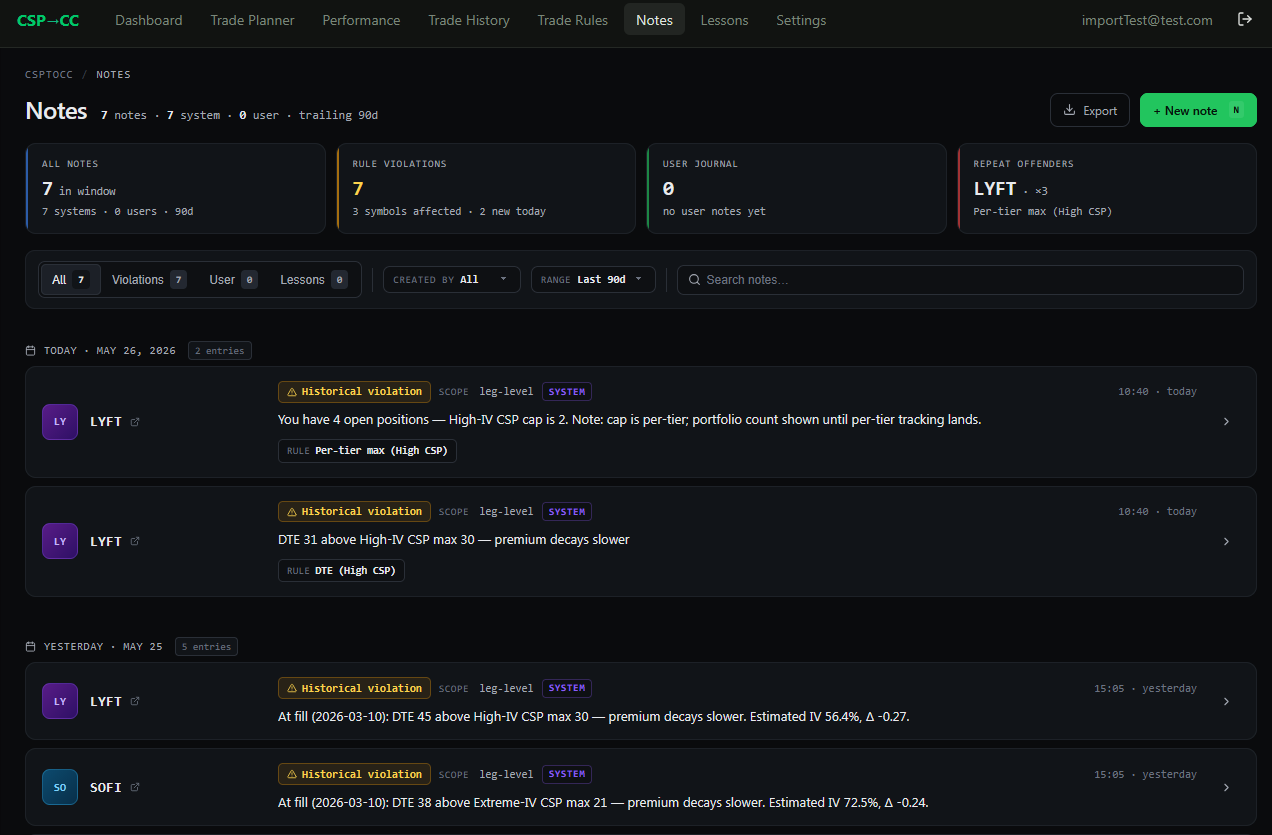
Every rule override gets a note. Every historical violation surfaced after a Polygon backfill gets a note. The Notes page rolls them up by symbol, by rule, by date. The "repeat offenders" tile calls out the rule you violate most often — and which symbol you most often violate it on. Add your own freeform notes alongside the auto-journal entries. Patterns surface whether you want them to or not.

  • Auto-journal · violation entries written when the validator fires + you commit anyway
  • Historical-violation backfill · re-evaluates imported trades against your current rules
  • Repeat-offender tile — the rule + symbol you keep hitting
  • User journal entries — add context, lessons, anything · searchable + exportable
NOTES · 7 notes · trailing 90dRepeat offender: LYFT × 3 Per-tier max
Notes page showing 7 system-generated rule violations from a Polygon historical backfill, grouped by day, with the LYFT repeat-offender callout in the stat tile.
Who built this

Made by a wheel trader who got tired of spreadsheets.

No VC. No growth team. One person running CSPs on a real account, a real day job, and a deep frustration with every "trade journal" that treats a roll like a brand new trade.

The campaign model came from a CDE trade that lost $40 in 24 hours during an earnings cluster. The decay visual came from staring at a 7-DTE position and not knowing whether to close. Every feature traces back to a moment.

  • ~$13K account · CSPs on T, AEO, HIMS, BBWI, SOFI, F, NVO
  • ~1 year wheeling, learned the hard way from r/thetagang
  • Dev lead by day · solo builder by evening

"Every trade journal I tried treated a roll like a brand new trade. After three rolls I had no idea what my real breakeven was. So I stopped using them and built the thing I wished existed."

WH
The CSPtoCC founder
Solo dev · active wheel trader
Pricing

Free forever for the basics.
Pro pays for itself in one good roll.

Free forever — not a 14-day trial, not invite-only, not "we'll let you in eventually." Log your wheel trades manually, run the Planning Board on your own watchlist, see your decay states live. Pro is when broker sync, unlimited campaigns, and the chain grid become worth $29 a month — and you'll know exactly when that is.

Free
$0forever

Run the campaign model, see the decay visual, plan around earnings. Imported history grandfathered — no surprise downgrades.

  • One-time free broker import — last 90 days, no card required
  • 3 active campaigns going forward (imported ones grandfathered)
  • Unlimited campaign history
  • 15 watchlist symbols · earnings calendar
  • Decay visual — full color states
  • Planning Board calendar
  • Saved trade rule sets
  • Center expiry chain · 5 strikes · 15-min delayed
  • Continuous broker sync (Pro)
  • History backfill beyond 90 days (Pro)
  • Live IV column & IV rank
  • Daily email digest
Start free
Founding 50
$19/ month · locked for life

Same as Pro, but you help shape the roadmap and you keep the price forever.

  • Everything in Pro
  • $19/mo locked — never rises, even when Pro does
  • Direct line to the founder for feedback
  • Private Discord channel
  • Early access to new broker integrations
  • "Founding member" badge in-app
Join the waitlist
Founding 50 seats · join the waitlist to claim one
FAQ

Questions a wheel trader
would actually ask.

Is CSPtoCC a broker? Do you execute trades?
No. CSPtoCC is an educational and tracking tool. You execute trades in your broker (tastytrade, E*Trade, Schwab). CSPtoCC pulls fills via the broker API and turns them into campaigns. Nothing is ever sent the other direction — we can't and don't place orders.
What's a "campaign," really?
One full wheel cycle on one underlying with one broker. First CSP, every roll, optional assignment, every CC, final close. All as one record with running cost basis. Two different brokers on the same symbol = two campaigns — they can't share legs.
How does roll detection know it's a roll and not a new trade?
Trading-day window, not calendar days. Default is 7 trading days, configurable 3–21. Closing a put Friday and opening another Tuesday morning after a long weekend is still the same wheel cycle — calendar rules would miss that. You can override either way per-order if the auto-detection guesses wrong.
How do you compare to buy-and-hold?
The Portfolio Return tile on the Dashboard runs your realized P/L through the same window as SPY's total return over the same dates. Same start date, same end date, same dollars. If SPY is winning, it shows you SPY is winning — we don't curate the comparison. That's the point. The 30-second answer to "is wheeling actually working for me right now" lives there, not in a head-canon narrative. Pro feature; toggle CAGR or simple math per tile.
Do I have to connect my broker?
No, but it's the fastest way to see the campaign model on your own data. Free signups get a one-time import of the last 90 days from tastytrade or E*Trade — no card, no trial. Imported campaigns are grandfathered against the 3-active-campaign limit, so you keep what you brought in. Manual logging works fully without a broker, too. Pro extends to continuous sync of new fills and full historical backfill beyond 90 days.
Why no iron condors, spreads, strangles?
Because CSPtoCC is wheel-strategy native. Spreads are a different product with a different audience. Adding them would dilute the campaign model and the screens that make this useful. PMCC is on the roadmap (same community, natural extension). Iron condors are not.
What happens to my data if I cancel?
You downgrade to Free. Your campaign history is preserved — Free has unlimited history, just a cap on concurrent active campaigns and watchlist size. You can export everything as CSV at any time.
When's the launch?
Private beta in December 2026 with the founding 50. Phase A (the trader using it daily) is live now. Phase B (a second trader can onboard solo) is mid-2026. Public launch with full $29/mo pricing in Q1 2027.
Is this financial advice?
No. CSPtoCC is an educational tool that surfaces information about your own trades and watchlist. It does not recommend trades, does not provide investment advice, and is not a substitute for your own judgment. Options trading involves significant risk of loss.
Get in early. Lock $19 for life.

Founding 50 seats at $19/mo locked for life. Beta opens December 2026.

No spam. One email when beta opens. Unsubscribe in one click.